Running the survey: the kiosk
How to set up a kiosk session with tablets, how to survey where there is no signal, how to run people through it, and what to do when something goes wrong.
The kiosk means responding from a tablet at the workplace. It exists for a concrete reason: in most organizations that measure climate, the majority of people have no corporate email and no computer. A survey that only arrives by mail measures desk workers.
How it works, in one sentence
You open a station for each tablet, you check in whoever sits down, they respond, and the station frees itself for the next person.
Setting up the session
1. Open one station per tablet. Each gives you a link —or a QR— that you open once on that tablet. That link is what turns the device into a station for this study.
2. Leave the tablet on that screen. Nobody needs to sign in on it; the tablet has no account and no user. It is a capture device, not a workstation.
3. Run the queue. When someone sits down, you check them in from the panel. The tablet loads their questionnaire. When they finish, the station frees itself and is ready for the next person.
Check-in is done by the operator, not by the person responding. That is what stops anyone from responding twice or responding for someone else, and what lets forty people pass through one tablet in a morning without any of them seeing anything from the previous one.
Several tablets at once
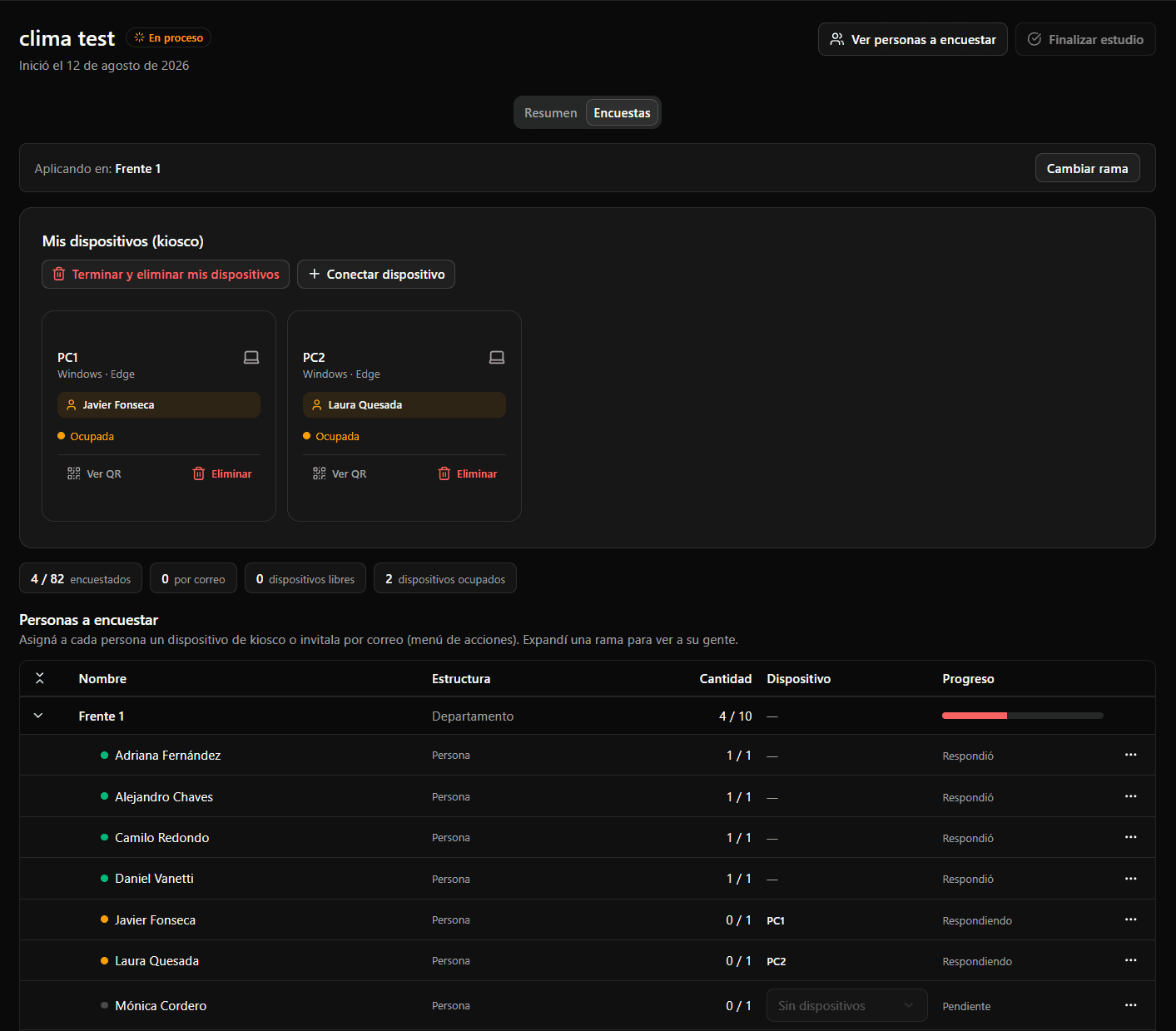
You can open as many stations as you have tablets, and the panel shows them all: which is free, which is busy, and who is responding at each.
Each session is yours. If two HR people are surveying different branches, each sees their own tablets. They do not collide and cannot shut down each other's stations.
Station states
| State | What it means |
|---|---|
| Available | Ready for the next check-in |
| Busy | Someone is responding right now |
| Disconnected | The tablet has not reported in for a while |
«Disconnected» breaks nothing. It is a presence indicator: it tells you the tablet was switched off, ran out of battery or lost wifi. Nothing expires because of it, and closing the tablet's tab does not unregister the device. When it comes back, it keeps working.
No signal: the offline session
On a farm, in a warehouse or a basement there is often no internet. For that, the tablet can work offline: it stores the answers on the device itself and uploads them on its own when the signal comes back.
1. Prepare it with signal, from the panel. On the station's card, «Prepare for offline»: you choose which parts of the structure that tablet will survey (at any level) and set a PIN of 4 to 8 digits for the person in charge. The pending people in those branches are reserved for that tablet.
2. On the tablet, still with signal, tap «Trabajar sin conexión» and enter the PIN. The tablet downloads what it needs: the questionnaires and the list of people. From then on it opens and works with no network.
3. Survey as usual. The person in charge checks people in on the tablet itself, with the PIN, and each person answers their questionnaire.
4. When the signal returns, it uploads by itself. Answers are sent in batches, without anyone doing anything. To close, tap «Terminar jornada» on the tablet, with signal: it uploads whatever is left and releases the people who did not respond. (The tablet screens are in Spanish, like everything the people answering see.)
Worth knowing beforehand:
- A reserved person does not come in through another channel. While the session lasts they cannot be checked in online or sent the invitation by email or WhatsApp. That is what guarantees nobody answers twice.
- The package is downloaded only once. If you switch tablets, cancel the package and prepare another.
- The session lasts one day. The package expires after 48 hours, but expiring does not erase what was stored: the tablet still uploads it once it has signal.
- The study cannot be finished with open packages. Otherwise whatever a tablet has not uploaded yet would be left out for good. End the session or cancel the package first.
- Cancelling or deleting loses what was not uploaded. The panel warns before you confirm: whatever the tablet stored and has not sent can no longer be uploaded.
Anonymity is the same as online: the tablet uploads who took part on one side and what was answered on the other, shuffled and with no link between the two.
Mixed mode: kiosk, email and WhatsApp together
It is not all or nothing. You can be running the kiosk session and, for one person who did not show up, send them the invitation by email or WhatsApp without taking them out of the kiosk.
That is the sane setup for a mixed organization: the plant responds on tablets and the ten people in admin by email, in the same study. See Announcing the survey.
Anonymity during capture
Worth stating plainly, because this is where people doubt most: the kiosk does not weaken anonymity.
The system knows a person's turn came up —that is participation, and it is what lets you know who is left— and it stores their response separately, with no link between the two. The operator doing check-in does not see what gets answered, and the tablet keeps nothing from the previous person.
The fragile part is not technical, it is physical. A tablet against a wall with its screen facing the queue ruins perceived anonymity however impeccable the system is. Point it at a wall, not at the aisle — and keep managers away.
When something goes wrong
Someone walked off mid-survey. Close the station and reopen it. That person stays unanswered, and you can check them in again later.
A tablet ran out of battery. The session is not lost: that station shows as disconnected and the rest keep working. With the tablet back, you open the link again.
You lost a station's link. It can be viewed again from the panel; you do not need to create a new station.
The session is over. Close the stations. There is an action to close them all at once, and another to delete temporary devices you will not use again.
Before the first session
Test with one tablet and one person before forming a queue. The flow is simple, but the first time is worth seeing without twenty people waiting.
Do the arithmetic. Multiply how long one response takes by the people in that branch and divide by the number of tablets. The number tends to be larger than expected, and it is what tells you how many tablets to bring.
Announce it first. See Announcing the survey.